One of the most commonly asked questions in YouTube comments or Twitch streams is: “rnd, what mods do you use?”
So, this page is dedicated to answering that question.
This will only cover the mods I use in Risk of Rain 2 because that’s all I play. If, in the future, I end up playing other games with mods in them, I will add them here as well.
If you haven’t modded before, check out my guide to installing Risk of Rain 2 mods.
Use this code in r2modman to get my mod list –
Starstorm2 + a bunch of modded survivors: 01996f7d-2f37-e13f-0937-fdd93f37f9cd
Vanilla + QOL mods: 019dd652-7b12-1636-eb45-350afdf776d3
Tutorial on how to use the codes: https://www.youtube.com/watch?v=eMKY6rw7Rb0
What Risk of Rain 2 Mods Does rndThursday Use?
Throughout many videos, I have used several mods in Risk of Rain 2—mostly QOL mods.
My absolute favorite mods that I always keep installed are:
- ItemStats – Moffein
- LookingGlass – DropPod
- PhotoMode – Dragonyck
- DebugToolkit – IHarbHD
- Actually_Faster – Felda
- ProperSave – KingEnderBrine
ItemStats shows you what the item actually does and how it stacks instead of the default flavor text. I highly recommend it for new players, so you aren’t forced to Google every item you pick up.
Some people like using BetterUI, which also shows item/equipment stats but adds other things. Sorted items, DPSMeter, player stats, etc. All of these can be turned on or off in the configuration files, allowing for lots of flexibility.
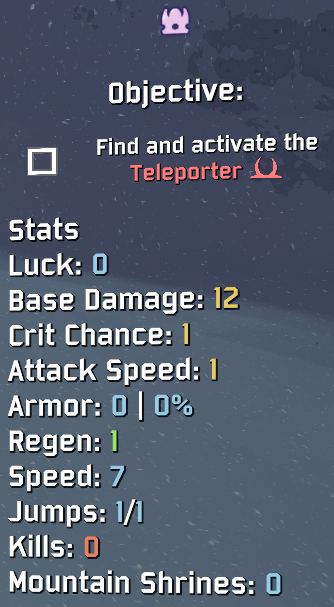
I currently use LookingGlass (that’s what the stats on the side of my videos are), which does a whole bunch of things and is similar to BetterUI.

PhotoMode is for taking screenshots. You can pause the game and go into third-person mode with the in-game UI hidden. This makes it easier to take good-looking screenshots with the added benefit of being able to explore the map.

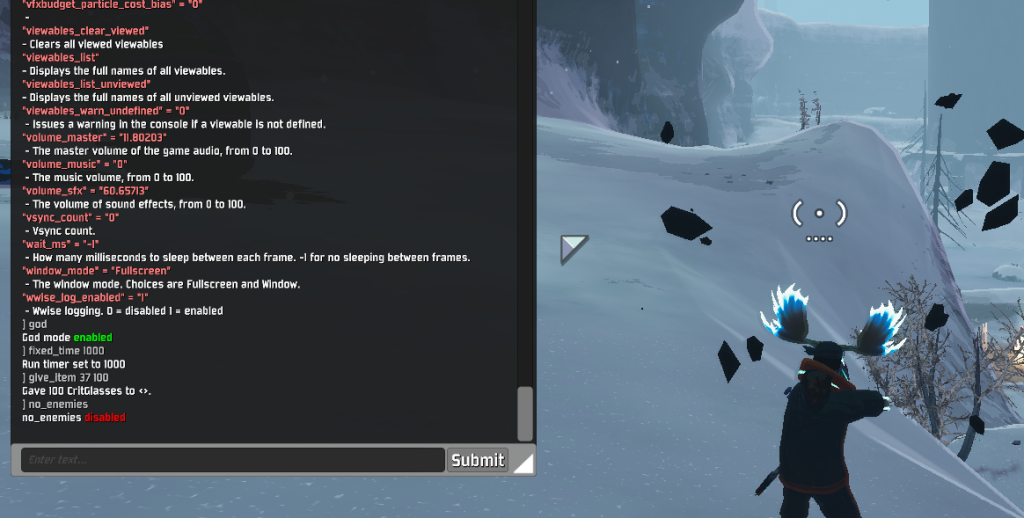
DebugToolkit adds debugging tools to the console. You can turn on god mode, give yourself items, change the time in-game, spawn specific enemies, turn yourself into a drone, change stages, etc. Basically, anything you’d need to test items/survivors/mechanics, which is what I use it for.
Without this mod, I would be lost.
Paired with PhotoMode, this can generate some amazing screenshots (which can be turned into thumbnails).
Actually_Faster can be summed up from it’s mod description:
A mod that makes the printer, scrapper, chance shrine and cauldrons go brrrrrt. This one actually works!
ProperSave lets you save your game. Now, when your mom tells you to save your game and get off the computer, you can! The one caveat is that it only saves at the beginning of the stage, so your progress during a stage won’t be saved.

Mods In Specific Videos
— —
None
None. I’m just that good.
Ok. That’s it.
.
.
.
.
….what?
Oh, you expected some premium mods?
You are one sick freak, you know that?
What do I look like to you? Some pervert that would host that type of filth on my website?
And you know what? I’m insulted you would even think that. I mean, do I give off that type of vibe or something?
Like some disgusting pornographer with all sorts of odd kinky recordings hidden under my trench coat as I stalk the alleyways looking for the most depraved cretins in the underbelly of our society specifically because they are the only ones who would be desperate enough to purchase my twisted smut?
I can’t believe you. I’m appalled you would even insinuate that. How low do you think of me?
Better yet, how low do you think of yourself? What self-respecting individual would be perusing the interwebs to modify a T-rated game!? These are cartoon characters! They fight monsters!
Gosh. I mean, really!
Go. Leave! Take your loathsome self off my website. We do not welcome the likes of you! And don’t you dare look for any more of that repugnant content on this page! It does not exist.
GO!